


Goal
In the Klara dashboard account settings, select the desired language and voice, define the opening and closing phrases for Interviewer and Recruiter mode, and optimize applicant communication through a tailored combination of language, tone, and call timing.
Requirements:
You are registered and can log in to the Klara dashboard.
You already know in which language Klara should operate.
You are clear about which phrases Klara should use at the beginning and end of a conversation.
1. Select Language
- Log in to your Klara dashboard with your credentials.
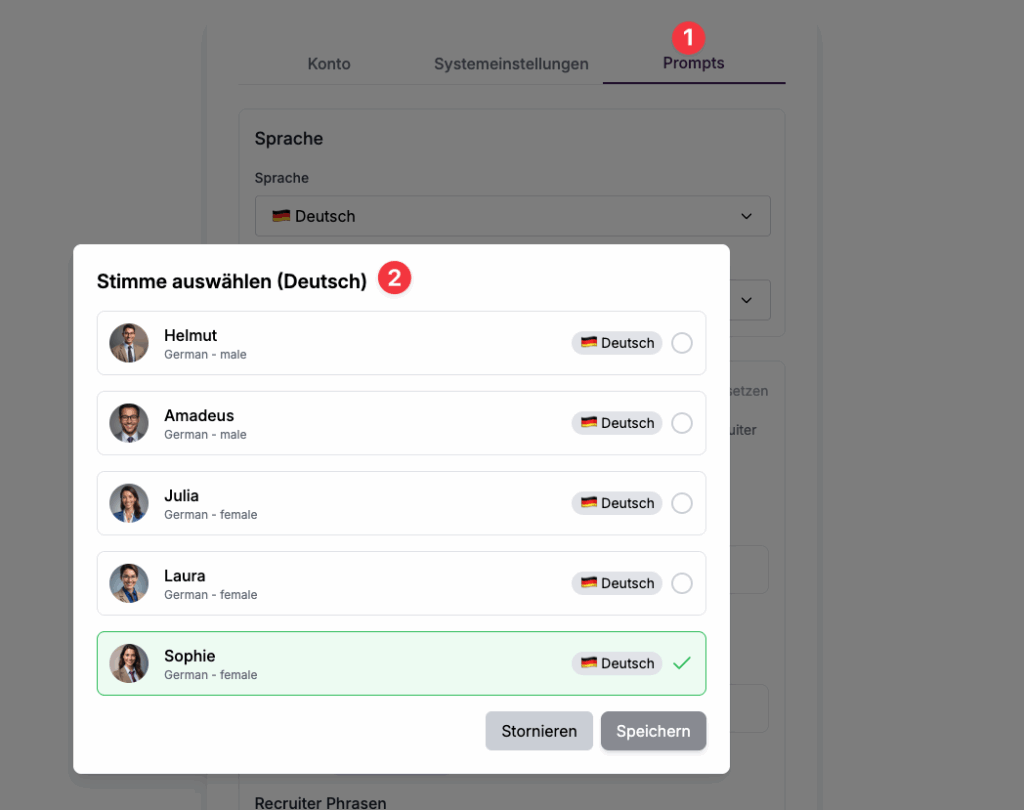
- Click Account Settings → Prompts.
- Under Language, select the desired language (German, English, Dutch, French).
Then select the desired voice for Klara to use.
2. Opening and Closing Phrase for Interviewer
Define the opening phrase that Klara should use at the beginning of a call.
You can insert the variable “candidate.name” (full name of the candidate from Recruitee) to enable a personalized greeting.
Next, define the closing phrase that Klara should use at the end of a conversation.
Save the settings.
Frequently Asked Questions (FAQ)
In which languages can Klara speak?
– Klara currently speaks German, English, Dutch, and French.
Can I change the language at any time?
– Yes, you can adjust the language at any time in the Klara dashboard. The change usually takes effect within a few minutes.
Which language should I choose?
– Select the language your applicants understand best. For international audiences, English is recommended; for regional audiences, the respective local language is preferable.
Troubleshooting & Support
Sollten Sie Probleme bei der Auswahl oder Umstellung der Sprache haben, gehen Sie wie folgt vor:
- Überprüfen Sie Ihre Internetverbindung.
- Melden Sie sich im Klara-Dashboard ab und erneut an.
- Prüfen Sie, ob die Änderungen gespeichert wurden.
- Wenn das Problem weiterhin besteht, wenden Sie sich an unseren Support per E-Mail.